Posts

Showing posts with the label Cognos

Null Handling Example in my 'Extending Module – Creating Custom Calculations' video course
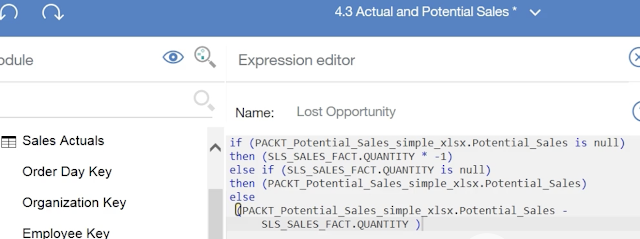
Image
I received feedback on the 'Extending Module – Creating Custom Calculations' video from my ' First Guide to Dashboards using IBM Cognos Analytics (V11) ' video course, that I was too fast in this video and hence some viewers are not able to follow what I am trying to teach in the NULL handling (IF .. ELSE) part.  Hence I am trying to elaborate on this topic in this blog. In this video, we are learning how to create simple mathematical calulcation items using our own (customized) calculation expression.  We are start with simple subtraction of two items namely: Potential Sales and Actual Sales. We are calling it Lost Opportunity .  The expression for Lost Opportunity is: Potential Sales minus Sales Qty. This would work fine when we are values for both the data items. However, there could be certain months, for certain products, where we have 'Potential Sales' data but the Actual Sales Quantity is not present (NULL) and vice versa. It is the standard behaviour of ...

Cognos Dashboard Course (PACKT): Not able to find GO WAREHOUSE

Image
My of my video course subscribers complained that the 'GO WAREHOUSE' model cannot be found in the IBM Cognos in Cloud.  Please note that I made two video courses in the year of 2017 when Cognos v11 (Cognos Analytics in Cloud) for first launched. That time this model was available. Afterwards (in 2020), it was updated and renamed. So I suggest the following options to the learners: Option 1: Move to the newer video course that I published in the year 2020. In this course, I am providing data files that the learner can upload and use. It does not rely on IBM provided data models. Here are the links for this course: O'Reilly:  https://learning.oreilly.com/videos/first-guide-to/9781800203419 Packt:  https://www.packtpub.com/data/first-guide-to-dashboards-using-ibm-cognos-analytics-v11-1-r5-second-edition-video Udemy:  https://www.udemy.com/course/first-guide-to-dashboards-using-ibm-cognos-analytics/ Option2: If it is not possible to grab above new video course, or if you...

Now on Udemy too!

Image
Finally, my Cognos Analytics Dashboard Video Course is available on three platforms that I was intending. This provides flexibility to the learners to use the platform of their choice, and avail best pricing and offers. Posting all three links here: O'Reilly:  https://learning.oreilly.com/videos/first-guide-to/9781800203419 Packt:  https://www.packtpub.com/data/first-guide-to-dashboards-using-ibm-cognos-analytics-v11-1-r5-second-edition-video Udemy:  https://www.udemy.com/course/first-guide-to-dashboards-using-ibm-cognos-analytics/ Happy Learning to everyone!

'Members' in Cognos Analytics - Extremely powerful and unique feature

Image
Cognos has always had a very powerful feature called 'Dimensionally Modelled Relational (DMR)' schema. Basically, even if you are not using a pure Dimensional Database (like Transformer Cubes or TM1), Cognos allowed modelling Dimensions, Hierarchies, Levels, etc on top of the Relational Data sources. This way it allowed the Report Authors to drag only a specific element from the dimension rather than dragging the whole column and then filtering for values. It also allowed using the Dimension functions like Children(), Siblings() etc. This feature is also available out of box when using Cognos Analytics. In Cognos Analytics, when you create a Data Module, and specify a data item (column) as Identifier or Attribute, you can enable the 'Members' property. When you do that, Cognos will find the Unique Members or Elements from the column and show them in the tree. These 'members' can be then independently dragged on the rows or columns, essentially creating a filtere...

Now on O'Reilly too!

Image
I am excited to present the second edition of video course on Building Stunning Dashboards using IBM Cognos Analytics v11.1 R5. This course is now available on O'Reilly. Luckily many professionals have a corporate account provided by employers for O'Reilly.  So do check out:  https://learning.oreilly.com/videos/first-guide-to/9781800203419

Tracing user activities across AUDIT, IIS and Cognos Logs

Image
Some times for stubborn intermittent problems like users complaining 'random' slow down of reports or errors without any description, you want to investigate multiple layers. You can start with following: 1.        Enable Cognos Auditing and check COGPIF_USERLOGON with COGPIF_ACTION to understand what operations were exactly going on during the time of error/slow down. 2.        Tally that with IIS Logs. In case of multi-server deployment, Audit gives you the IP Address of application server that handled the request. If there are any network related issues, IIS might have more information. If IIS logs have no corresponding entries, you know that client (Analysis Studio, Workspace Advanced, etc) is not even hitting the server. 3.        If IIS logs show corresponding entries, POST and GET operation and no network related errors, then check for Cognos logs (cogserver.log) ...

IBM Cognos TM1 Cookbook book and eBook by Ankit Garg

Image
Congratulation to Ankit Garg on publication of his book on Cognos TM1! Another addition to PACKT's cookbook series with this great contribution by Ankit Garg to the world of BI. Please do check out this book today. . A comprehensive developer’s guide for planning, building, and managing practical applications with IBM TM1 . No prior knowledge of TM1 expected . Complete coverage of all the important aspects of IBM TM1 in carefully planned step-by-step practical demos . Practical recipes that illustrate the use of various TM1 features http://www.packtpub.com/ibm-cognos-tm1-for-planning-budgeting-forecasting-solutions-cookbook/book

Copying multiple Report Studio reports into one

Image
Some times we create seperate reports but later on require to copy them all into one to make a report pack. Though Report Studio is very good in allowing us copy paste individual objects across, you need to be very cautious otherwise you will end up spending hours in fixing errors. In my understanding, if you follow below steps, you will be fine. 1. Open the first report in studio that you would like to copy in the pack. 2. First of copy all required Query Subjects across to destination by going in query explorer. 3. Then copy the conditional variables across to destination report. 4. Now we need to copy the Conditional Styles across but unfortunately it is not direct copy-paste operation. Hence, you will need to open both source and destination reports' XML specification in an editor. Then locate the Conditional Style tags from source report (they are usually towards the end of specification) and copy them to destination reports. 5. Now bring the modified specification back in re...

Retrieving FM package from a published package in Cognos connection

Image
By Dilip Aghav: It often happens that you need to work a package that was published long time back and you don't have or can't find the original Framework Model now. What to do in that? Recreate the FM model? No need... Find below the steps to recover, or we can say recreate, the FM Model using published package. 1. Create a blank file called cqeconfig.xml and save under Cognos8/bin on the server. 2. Write following code in this file: 3. Restart the Cognos 8 service for the change to take effect. 4. Stop the Cognos 8 service. 5. Rename the cognos8/data/cqe/rtmodel directory on app server to a different name. 6. Start the Cognos 8 Service 7. Create a new report using the package you wish to recover. 8. A new Cognos8/data/cqe/rtmodel directory will be created, and an XML file will be added to it. This model contains the information you need for your framework model. Take a copy of this file on your local or on the machine where you have FM installed. 9. Create empty project...

Changing Package of multiple reports

Image
It's a common question amongst the developers - how to change package of multiple reports in one go! Unfortunately, Cognos doesn't have any built-in facility to do this at the moment. However, there are some work-around for this. 1. Use third party tools: Some private tools hook-up to Cognos Content Store and allow you editing multiple reports simultaneously. This includes changing the report package, access permissions, visibility, etc. 2. DIY: In this simple Do It Yourself method of doing bulk update on reports, I place all the reports in one folder. Then generate deployment archive of the folder using Export wizard. This pushes all the report definitions in one xml file. Pick up the deployment archive, unzip and examine the xmls. Once you find the xml that contains all the reports, open it in a good xml editor. Now, search for the package name and identify the pattern you need to replace. Now, simply replace all the instances of package name using that pattern, put the fil...

Suppress Zero for rows and columns

Image
Environment: Cognos Report Studio 8.2, SQL Server Cube 2005 Suppress zero rows and columns for crosstab reports built in report studio over SQL server cube can be quite a bit of pain, due to the fact that there is no in-built suppression facility. You might be tempted to use the Suppression option from Query properties, but will be disappointed to know that it works only for SAP. So, in order to suppress the rows or columns you can use following. Solution: Assume that you are showing LOCATIONS on rows, and MONTHS on columns. Your measure is UNIT SOLD. This is the easiest example I can think of. You simply need to modify the rows and columns expression to below: filter([myCube].[Location].[Location Names],([myCube].[Measures].[Units Sold])>0) filter([myCube].[Date].[Months],([myCube].[Measures].[Units Sold])>0) So Cognos will populate the rows and columns with only those members whose 'Units Sold' is not zero. If your measure can have negative values too, for example: Rev...